

Role: Teacher
Estimated time: 5–6 minutes
What this guide helps you do
TeachersAI marks against your answers, your rubric and the context you give it. Context is where you tell the AI what you would tell a colleague marking your class's work: what you taught, what a good answer looks like, and what you won't let slide. The more specific you are, the closer the AI's marks and feedback will be to your own.
There are two places to add context:
Assessment level context applies to every question in the assessment. Use it for the expectations and rules that run across the whole task.
Question context applies to one question only. Use it for model answers, accepted answers and how the marks are split.
Add assessment level context
In the Assessment Builder, click Settings (the gear in the left-hand menu).
Turn on Assessment Level Context.
Type your context into the box and click Save.
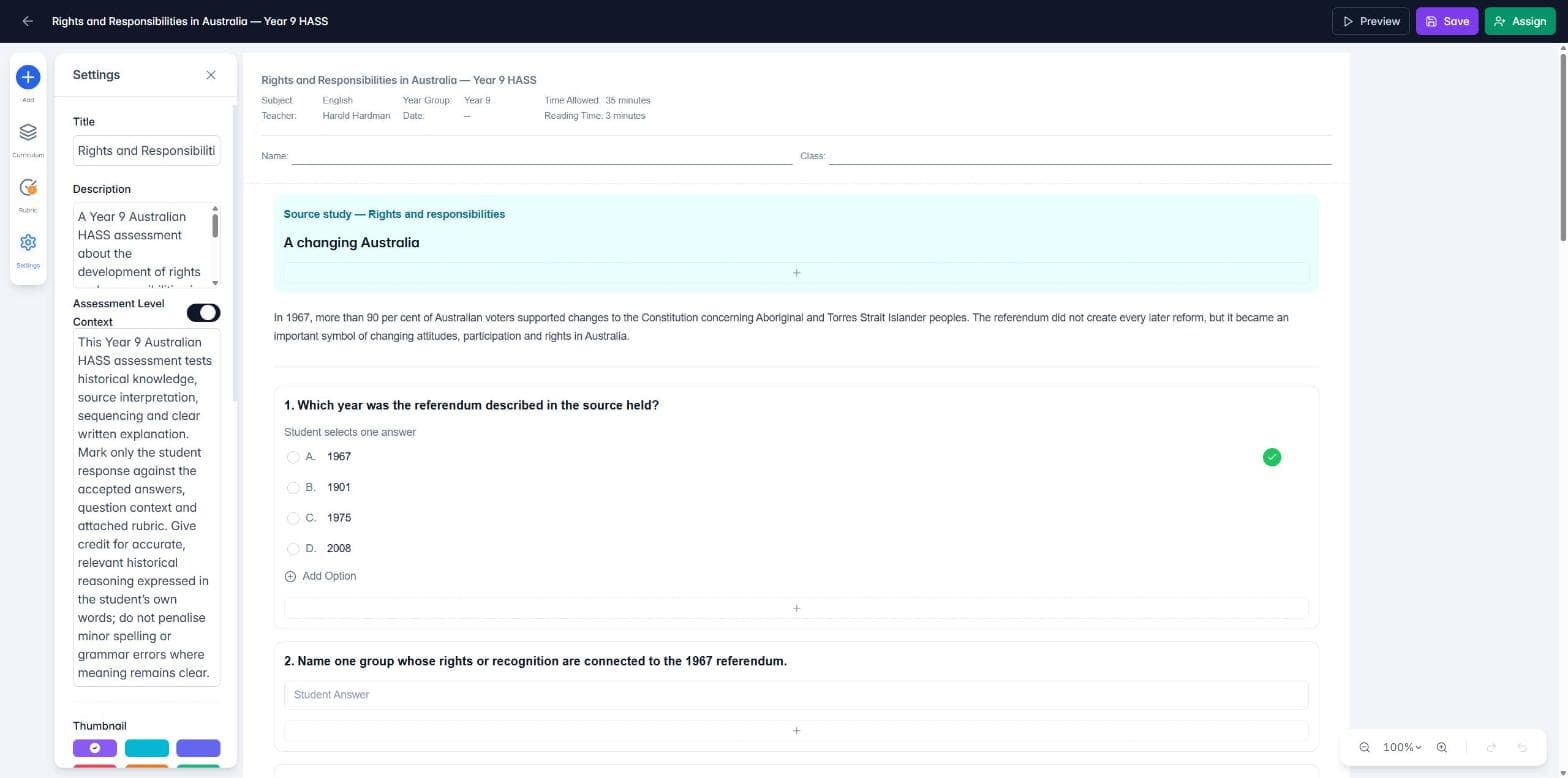
What to include
Year level and purpose: who the task is for and what it is checking.
The structures and strategies you have taught: for example, TEEL paragraphs (Topic sentence, Explanation, Evidence, Link), a particular essay scaffold, or a set method for showing working in maths. The AI cannot know what your class has been taught unless you tell it.
Your non-negotiables: anything you always penalise. If you expect Year 6 students never to miss a capital letter, say so, and say that each error should lose marks.
What to ignore: for example, minor spelling errors in subject words where the meaning is clear.
How strict to be on partial answers: whether a half-right answer can earn some of the marks.
Example of assessment level context:
Year 6 English, persuasive writing. Students have been taught to write body paragraphs using TEEL (Topic sentence, Explanation, Evidence, Link). Mark strictly against TEEL: a paragraph with no clear topic sentence or no link back to the argument cannot receive full marks. Year 6 students are expected to use a capital letter at the start of every sentence and for proper nouns, and to end every sentence with correct punctuation. Deduct for each capital letter or punctuation error. Do not penalise the spelling of topic words if the meaning is clear.
Add context to a question
Select the question. Click the small handle at the top of its outline so you open its settings rather than start typing in it.
In the properties panel on the right, find Context (context at question level).
Type the suggested answers, model responses and what to look for. You have up to 2,500 characters per question.
Click Save.
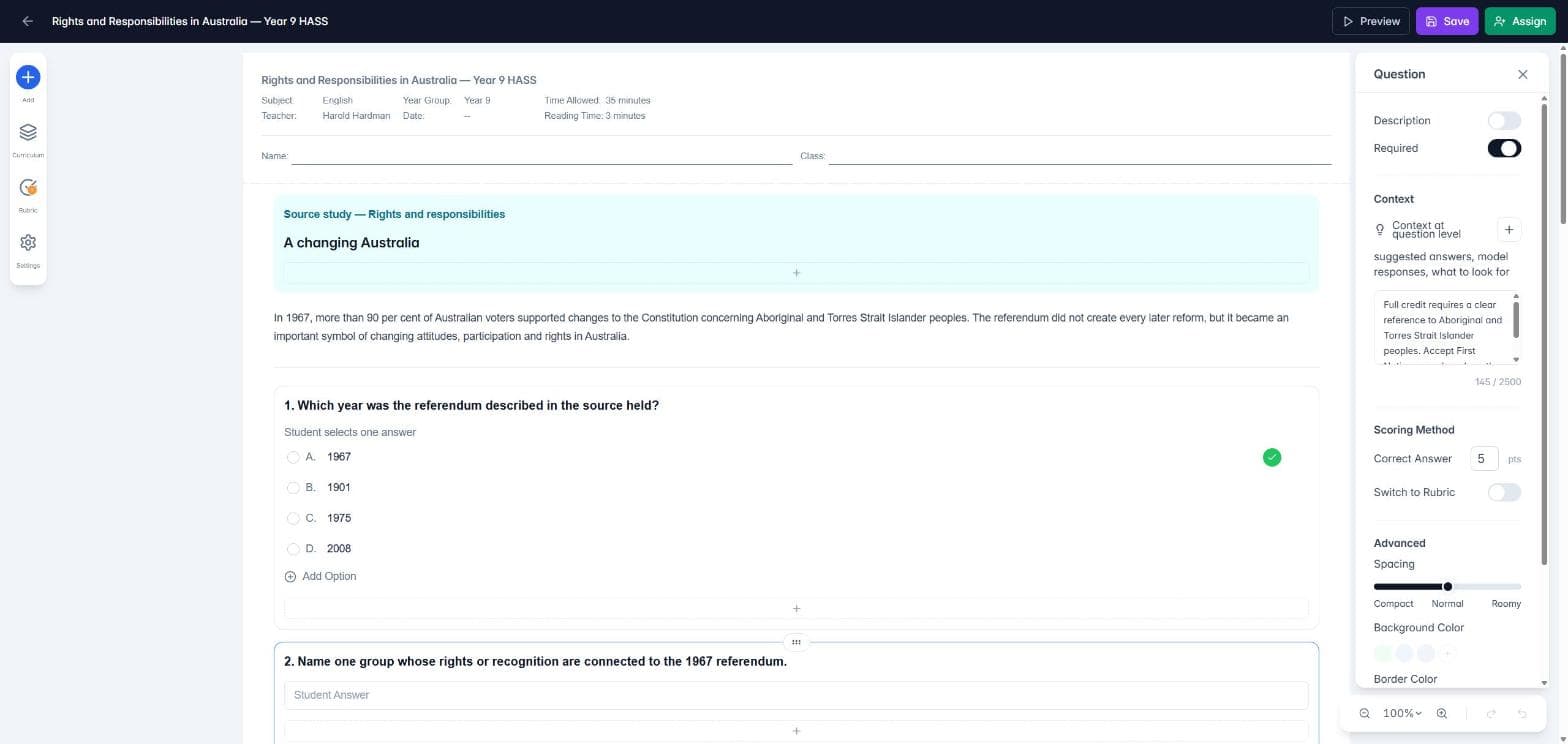
What to include
A model answer, or the key points a full-mark answer must contain.
How the marks are split: for example, 1 mark for naming a change and 1 mark for explaining why it mattered.
Other answers you will accept: alternative wording, terms or examples.
Common errors: misconceptions you have seen before, and whether they earn any marks.
Example of question context:
Model answer: the 1967 referendum changed the Constitution so that Aboriginal and Torres Strait Islander peoples were counted in the national census and the Commonwealth could make laws for them. Award 2 marks: 1 for a correct change, 1 for explaining why it was significant. Accept "First Nations peoples" or "Indigenous Australians". A common error is saying the referendum gave Aboriginal people the right to vote. This is incorrect and earns no marks.
Strictness and context work together
When you assign the assessment, Grading Strictness in the Grading and Feedback section sets how hard the AI marks, from Supportive to Exacting. It applies to open-ended and rubric questions. Questions with a set answer, such as Choice or Matching, are always marked against your answer key.
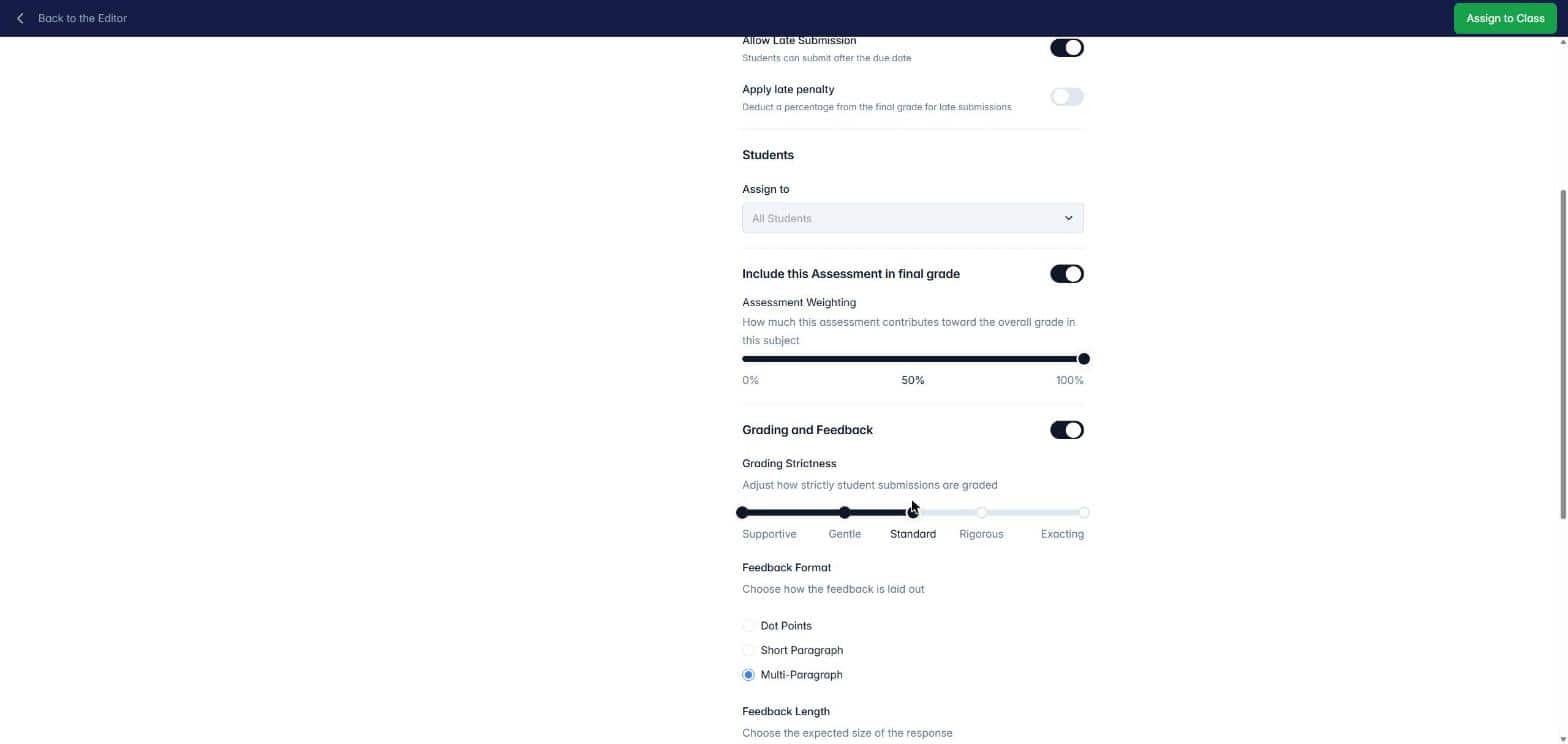
Strictness tells the AI how hard to mark. Context tells it what to look for. A Rigorous or Exacting setting will not penalise a missing TEEL structure or a lower-case sentence start unless your context says those things are expected. If you want something marked down from the start, put it in the context.
Tips for writing good context
Write it like a note to a relief teacher marking your class's work for the first time.
Be specific. "Mark strictly" is vague. "Deduct 1 mark for each missing capital letter" is clear.
Keep the two levels consistent. Put rules that apply everywhere at the assessment level, and anything for one question in that question. Avoid saying different things in each.
Check the first few submissions. If the AI marks differently from you, add what it missed to the context and use the AI to remark.
Good to know
The AI treats your context as guidance for marking. It is never treated as part of the student's answer.
If a question uses a rubric, the AI marks against the rubric criteria. Context still helps by explaining what each level looks like in your class.
You stay in control. Every AI mark can be checked and changed before results are released.
Next: How do I create a marking rubric? and How do I mark work submitted by my students?